
End-to-end AI sales follow‑up, on email and WhatsApp.
LeadRad takes every lead from the first message to the meeting minutes and the next step. The AI does the routine work; your team steps in only where a person adds value.
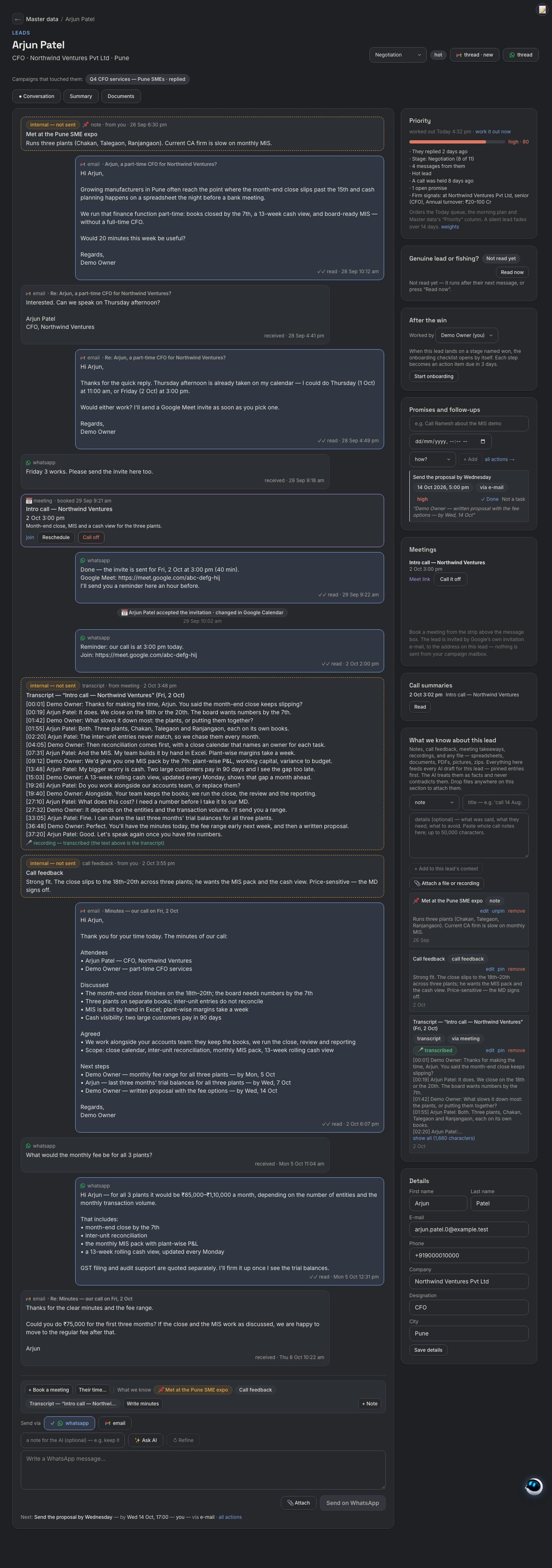
Sales follow‑up, run by AI. People only where they matter.
LeadRad runs the routine work of selling end to end, so a small team gets more done, at lower cost, with nothing missed.
Every lead, followed up
Each lead gets a timely, personal follow-up on the channel they actually use, at any hour.
More meetings, fewer cold leads
Fast answers, meetings booked inside the conversation, and no warm lead left waiting.
A small team, a big pipeline
A few people handle hundreds of conversations, and each AI job runs on the lowest-cost model that does it well.
Humans only where needed
The AI handles the routine. People step in for prices, complaints, legal questions and judgement calls.
Better for your buyers
Quick, accurate and consistent answers, drawn from your own knowledge, in the buyer's channel.
A stronger sales process
Every step logged, every promise tracked, the same playbook every time.
From first message to follow‑up, without the back‑and‑forth.
Any source, cleaned
From files, inboxes and online sources, fed in automatically and cleaned before they reach your database.
Every channel
Personal messages from all your mailboxes and WhatsApp numbers, paced and warmed up.
From your knowledge
Each reply is sorted and answered from your own knowledge base. Anything that needs a person comes to you.
No back-and-forth
Offers free times from your calendar, books when the lead picks one, checks for clashes, and handles reminders and reschedules.
Transcripts and minutes
Transcribes your calls and meetings (Google Meet transcripts, or recording in your browser), then drafts the summary and the minutes of meeting.
Next steps, done
Shares the minutes, sends the follow-up, tracks promises and chases quiet leads and open proposals.
Any format in. Only clean, useful data out.
Lead lists arrive messy: different formats, mismatched columns, duplicates and half-filled rows. LeadRad's clean-up engine reads each source, matches the columns, fixes and de-duplicates the data, and keeps only what belongs in your database.
Set a source once (a watched folder, Drive, Sheets, a Gmail label, a web link or a website form) and new leads keep flowing in by themselves.
- Reads any layout and matches columns, even when the names differ
- Fixes common errors in names, phone numbers and emails
- Merges duplicates into one record per person, with email and phone together
- Brings in only the fields you need, nothing else
- Asks you about anything unclear instead of guessing
- Then groups and scores the leads, ready for outreach
It answers the way your best salesperson would.
Teach LeadRad your business once. Every answer is drafted from what you give it, and every answer you approve makes it better.
Company documents
Company profile, products and services, pricing logic, industries you serve, service hours and terms.
Questions and answers
Add the questions leads keep asking with the answers you want used. Answers you approve are learned and reused.
Campaign material
Notes and links for each campaign or offer, so every reply fits the conversation it belongs to.
It remembers the whole relationship.
Every new reply draws on the lead's full history: past emails and WhatsApps, call and meeting transcripts and summaries, your notes and call feedback, and your company knowledge. So each reply picks up where the last conversation left off.
You choose how much it does alone.
Set it for everything, for one campaign or for one lead. Try any level in practice mode first and see what it would have sent.
Drafts only
LeadRad writes every message. You approve each one.
Handles routine
Sends simple answers, meeting invites and reminders. Drafts the rest.
Runs conversations
Answers interested leads, books meetings and chases quiet ones.
Runs everything
Runs the conversation to a booked meeting, then sends the minutes and the follow-up. Proposals still wait for you.
At every level, prices, complaints and legal questions wait for you, opt-outs are always honoured, and one click pauses everything.
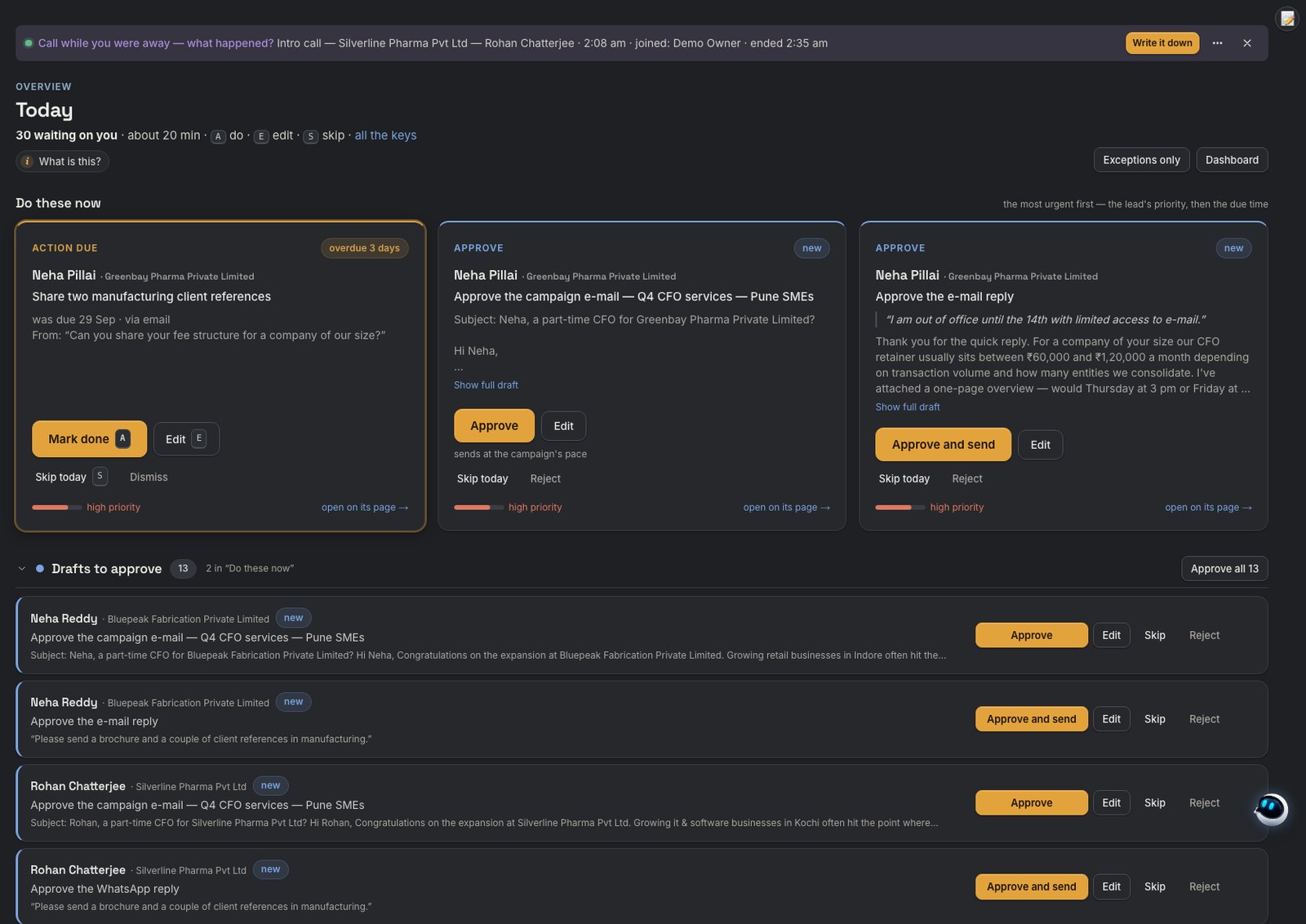
Everything that needs you, on one screen.
Drafts to approve, replies waiting and actions due, most urgent first. Approve, edit or skip with one click or one key.
Ask it in plain words. It runs the app for you.
A built-in co-pilot with more than 80 abilities, on the web and on WhatsApp: data, campaigns, settings, meetings and support. It answers from your live data, suggests the next job itself, and waits for your click before anything changes.
Every mailbox, every number, your whole team.
Many mailboxes
Gmail, Google Workspace or any IMAP/SMTP mailbox. New mailboxes warm up step by step, so messages keep landing in the inbox.
Many numbers
Connect several personal WhatsApp numbers by QR scan, each with its own daily sending limit.
Set up by us
We set up the official WhatsApp Business API from Meta for you. Meta bills its message charges to you directly.
Many users, clear roles
Owner, admin, manager, member and viewer. Each lead has one owner, and everyone sees what their role allows.
All in one inbox, with one thread per lead, so nobody double-messages a lead.
The right AI for each job.
Pick per job
Claude, GPT, Gemini, Mistral, DeepSeek and open models, including India-hosted options. Each job is tested on your own messages, and LeadRad suggests the cheapest one that does it well.
Ours or your own key
Use our AI and pay only for what you use, with a clear view of which job used each point. Or bring your own AI key.
Your own model
On request, a model trained on your own sales data, with your consent, kept private to your account. It can lower your AI cost and improve the quality of replies.
Every customer gets a private copy of LeadRad, with its own database and encryption key.
One app instead of four.
| Email outreach tools | WhatsApp broadcast tools | CRMs | AI sales agents | LeadRad | |
|---|---|---|---|---|---|
| Leads fed in automatically | Uploads or integrations | Uploads | Integrations | Uploads or CRM sync | Yes, from files, inboxes and online sources |
| Data clean-up and duplicate merging | Basic checks | No | Manual or add-ons | Rarely | Automatic |
| Email and WhatsApp in one thread per lead | Email only | WhatsApp only | Logs messages | Usually one channel | Yes |
| Many mailboxes, personal numbers and the official API | Many mailboxes | Official API only | Through add-ons | Usually one channel | All of them |
| Watches the inbox and flags what needs you | Basic reply detection | Shared inbox | Logs replies | Within their channel | Every reply sorted; urgent ones flagged |
| Answers replies from your knowledge | No, a person does | Fixed bot flows | No | Yes | Yes, with guardrails |
| Every reply uses the lead's full history, calls included | No | No | Stores history; AI replies often an add-on | Within their channel | Yes: messages, calls, meetings, notes |
| Finds a time and books the meeting in the chat | Booking link | No | Booking link | Often a booking link | Yes |
| Call and meeting transcripts, minutes and follow-up | No | No | Through add-ons | Rarely | Yes |
| Co-pilot that runs the app in plain words | No | No | Some, often at extra cost | Rarely | Yes, 80+ abilities, also on WhatsApp |
| Level of automation | Fixed sequences | Fixed flows | Rules you build | Mostly on or off | 4 levels, per campaign or lead |
| Choice of AI model | Rarely | Rarely | Their own AI | Their own AI | Per job, or your own key |
| Pricing | Often in US dollars, per user | Often a fee on each message | Often in US dollars, per user | Often higher monthly fees, some with setup fees | Rupee subscription + AI only for what you use |
One simple monthly plan.
- 3 users and 10,000 messages a month included
- AI use paid as prepaid points, only for what you use
- WhatsApp Business API message charges are billed by Meta to you directly
- 14-day free trial